Catalyst 11.1a Hotfix - BETA (8.820.2) - Win Vista/7 x32/x64
Napsal: úte 18. led 2011, 15:43
Driver je určen především pro karty řady HD 6000, ale starší řady (až po HD 2000) jsou podporovány také. Měl být uvolněn už dnes/zítra, ale vypuštění WHQL driveru se posouvá o týden kvůli několika dalším úpravám a následné certifikaci
Část release notes:


(Zdroj - Rage3D)
Stahujte:
I came in this morning and it seems as though our Driver Team had a few more last minute tweaks/changes which in turn delays the process for certification and testing and now the new date is firm for next week. The driver is a “release candidate” and we’re currently working on WHQL certification, the Driver Team is keeping me informed as to when it’ll go live. I’ve now been told that they’re working on a timeline to have it out by mid-next week, so most definitely either Wednesday 25th or Thursday 26th .
Část release notes:
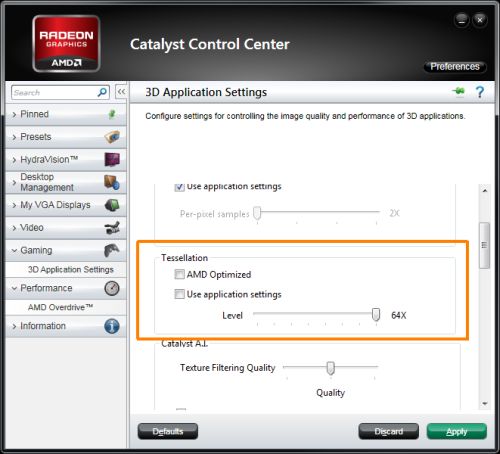
Takto vypadá to zmiňované menu se slidery pro nastavení úrovně teselaceThe latest Catalyst Hot-Fix; (11.1a) offers increased performance brings a slew of new features and should be the driver used for any performance testing. Below are a few of the highlights from this driver:
Performance improvements for the AMD Radeon HD 6800 & HD 6900 series include but not limited to:
AMD Radeon HD 6900 and AMD Radeon HD 6800 Series:AMD Radeon HD 6800 Series:
- 3DMark Vantage improves ~7%
- 3DMark06 improves ~3%
- Call of Duty Black Ops improves ~20% at 4xMSAA and up to 35% at 8xMSAA
- Riddick Assault on Dark Athena SSAO performance improves ~20%
- Unigine Heaven OpenGL performance improves ~10% at moderate, 30% at normal and 100% at extreme tessellation levels
AMD Radeon HD 6900 Series:
- Aliens vs. Predators improves ~9% at 2xMSAA and up to 20% at 4xMSAA
- Batman Arkham Asylum improves ~4%
- Crysis Warhead improves ~2-4%
- Metro 2033 improves ~28% at 4xMSAA
- Battleforge DirectX 11 performance improves as much as 6%
- The Catalyst Control Center includes an early prototype of some new tessellation controls. Our goal is to give users full control over the tessellation levels used in applications. The default selection “AMD Optimized” setting allows AMD, on a per application basis, to set the best level of tessellation. The intention is to help users get the maximum visual benefit of Tessellation, while minimizing the impact on performance. Currently no applications have been profiled, so the “AMD Optimized” setting will be non-operational until further notice.
- The “Use Application Settings” option gives applications full control over the Tessellation level. Users can also manually set the maximum tessellation level used by applications with the slider control
- The long term goal for the “AMD Optimized” setting is to use the Catalyst Application Profile mechanism to control the AMD recommended level of tessellation on a per application basis. AMD’s intention is to set the tessellation level such that we will not be reducing image quality in any way that would negatively impact the gaming experience.
(Zdroj - Rage3D)
Stahujte:
- AMD Catalyst Win7 8.82.2 Beta1 Jan13 (150,3 MB)